

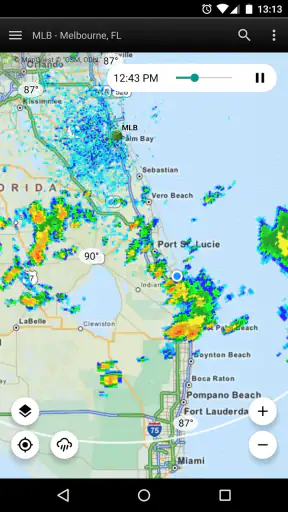
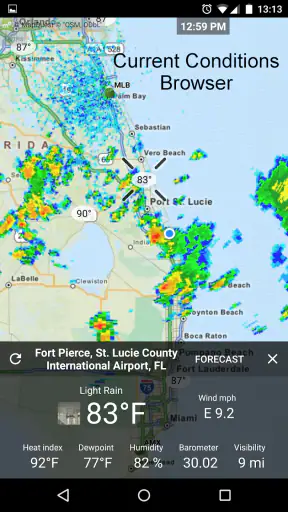
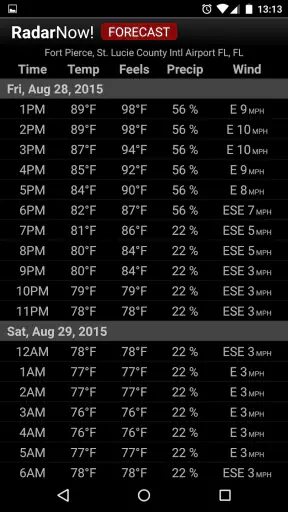
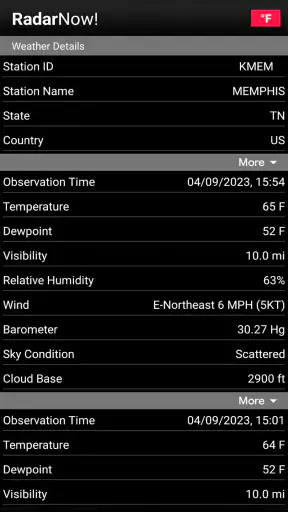
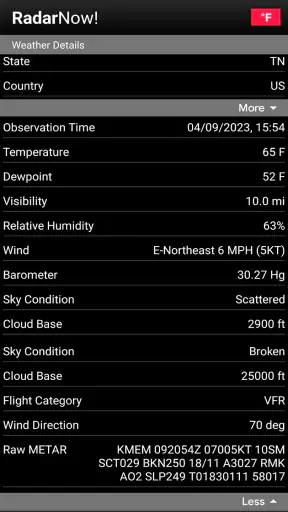
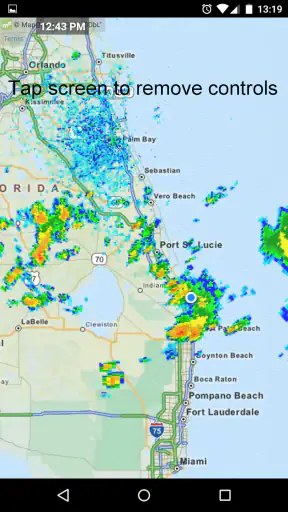
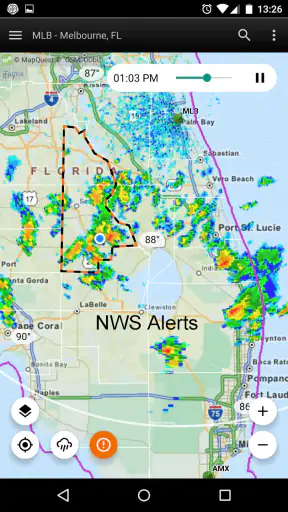
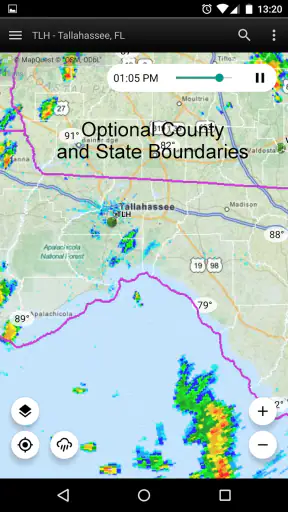
When I want a quick answer to “Is rain heading my way?”, I prefer a moving radar view over a page crowded with forecasts. RadarNow! ® is built around that simple habit. Developed by USNaviguide LLC, this free weather app focuses on giving me a direct look at current radar conditions rather than trying to become an all-purpose weather dashboard. After using it as a practical check before commuting, walking, or planning outdoor work, my view is clear: it is most useful for people who care about what precipitation is doing right now, not for people looking for a complete long-range weather service.
A focused radar tool that gets to the point
The app’s appeal is its narrow purpose. I open it, look at the radar display, and make a decision. That is a different experience from the usual weather alternatives, which often lead with temperature, hourly forecasts, alerts, pollution readings, sunrise information, and several layers of extra detail. Those services can be better when I need to plan an entire day or week. RadarNow! is better when the immediate question is whether a rain band is approaching, moving away, or breaking apart.
That focus also makes the app easier to understand at a glance. A radar image is not a promise that every street will receive rain at exactly the same moment, but it gives useful context that a single weather icon cannot. I can see the shape and movement of precipitation instead of relying only on a percentage. For short decisions, that visual information often feels more honest and more actionable.
The store describes it as a highly current NOAA radar display, and that emphasis matches how I use it. I do not treat the screen as a replacement for official warnings or local emergency instructions. I use it as a fast situational tool: check the map, identify the direction of the weather, and decide whether to leave now, wait, or take another route. That distinction matters because radar is strongest for near-term awareness, while a forecast service remains more useful for future planning.
What makes the radar view valuable in daily life
A realistic example is a short trip across town. Before leaving, I can check whether the colored area on the map is already over my route or still several miles away. If the precipitation is moving toward me, I may delay a few minutes or carry rain gear. If it is moving past the area, I can avoid cancelling plans based only on a dark cloud outside the window. This is a small workflow, but it is exactly where a radar-first app earns its place.
I also find the visual history helpful when judging direction. A single frame can be misleading: a patch may look close without actually moving toward my location. Watching the sequence gives a better sense of whether the system is advancing, weakening, or sliding to one side. That is one of the more useful habits with this kind of app, and it is easy to miss if you only glance at the latest image.
Another practical use is deciding how much confidence to place in a brief dry spell. If the map shows a large area behind the current rain, I may expect more unsettled conditions even if the immediate location looks clear. Conversely, scattered patches can make a forecast feel worse than the actual situation. Radar does not remove uncertainty, but it lets me see the uncertainty instead of hiding it behind one simplified symbol.
Simple enough for occasional users, useful enough for regular checks
RadarNow! is free and has an Everyone content rating, so it is approachable for a broad audience. It runs on Android devices using at least version 7.0, which makes it relevant to people who keep an older phone rather than upgrading for every new app. The current version is 7.2, and the product has reached more than five million installs, with an average rating of 4.8 from roughly eighty thousand ratings and about twenty-seven thousand written reviews. Those figures suggest that the focused approach has found a substantial audience, although popularity alone does not make radar interpretation effortless.
I would not describe the experience as a full meteorological lesson. The app is better for showing information than explaining every detail. New users may need a little time to understand the colors, motion, and scale of the display. That is not a serious flaw, but it is worth knowing before relying on the map during a stressful weather situation. A calm first look at the radar is much easier than trying to learn what everything means while already standing in heavy rain.
My advice is to spend one ordinary day comparing the display with what happens outside. Notice how quickly a nearby band reaches your location and how the colors correspond to the intensity you experience. This creates a personal reference point without pretending that the map can predict every street-level variation. It is a more useful way to learn the app than memorizing general rules about radar colors.
The important trade-off: radar is immediate, but not complete
The biggest limitation is also the defining design choice. A radar-centered app cannot answer every weather question as well as a broader forecast application. If I need tomorrow’s temperature range, a detailed hourly outlook, wind planning, or a wider collection of forecast information, I would rather use a conventional weather service alongside it. RadarNow! can help me understand current precipitation, but it should not be my only source for decisions that depend on several weather variables.
There is also a difference between seeing precipitation and knowing its exact impact at my front door. Radar data can show a nearby system while local conditions remain dry, or it can miss the practical effect of a brief shower in a small area. Buildings, terrain, and rapidly changing conditions can make a map look more certain than real life feels. I therefore treat the display as evidence, not a guarantee. The best result comes from combining the radar picture with what I can observe locally.
That limitation becomes more important during severe weather. A radar image is useful for awareness, but it is not a substitute for official emergency alerts, evacuation instructions, or local authorities. Someone choosing an app mainly for storm safety should consider whether they also have a trusted warning source. I would never use a convenient radar screen as permission to ignore an official warning simply because the map looks quiet at one moment.
The free price is another reason to try it, though the app also offers in-app purchases priced at $18.99 per item. I would approach those purchases carefully and decide whether any extra value matches my personal use. For an occasional “should I bring an umbrella?” check, the free starting point is the important part. A frequent user who spends a lot of time studying radar may judge additional options differently, but I would not pay automatically just because I use the map often.
How it compares with ordinary weather apps
Most standard weather apps are organized around a location summary: current temperature, an icon, a forecast line, and perhaps an hourly chart. That layout is convenient for general planning. It tells me whether the day is likely to be warm, cold, wet, or windy. The weakness is that a summary can hide the movement of a specific rain system. A percentage of precipitation does not show whether the rain is ten minutes away or likely to miss my neighborhood.
RadarNow! reverses that priority. It gives the map more importance than the forecast summary, which makes it a stronger companion for immediate timing. If I already have a favorite forecast app, I do not necessarily need to replace it. I can use the conventional app for temperature and future conditions, then open this one when precipitation is the deciding factor. That two-app workflow may be more sensible than demanding one application do everything equally well.
Compared with a general weather service, the trade-off is less clutter against less breadth. I appreciate not having to scan several cards before reaching the information I want. On the other hand, people who dislike interpreting maps may find a simple rain icon more comfortable. The right choice depends on whether I want the app to make a quick forecast summary for me or show me the evidence so I can make the short-term judgment myself.
It also differs from a basic weather widget. A widget is excellent for passive awareness because it sits on the home screen and requires almost no effort. RadarNow! asks me to look at a visual field and interpret movement. That extra step is worthwhile when timing matters, but unnecessary when I only want to know the current temperature. I see it as a deliberate tool rather than a background glance.
Small habits that make the app more useful
My first useful habit is to check movement, not just color. The strongest-looking area is not always the part that will reach me. I look at the sequence and identify the direction of travel before deciding whether to wait. This prevents a common mistake: assuming that the nearest visible patch is automatically the next patch over my location.
My second habit is to use the app before making a decision, then check again if the decision is time-sensitive. Weather can change while I am getting ready, especially when a narrow band is nearby. A single check is enough for a casual walk, but a delivery, outdoor job, or drive through changing conditions deserves a fresh look. The app is particularly good at supporting that repeat-check routine because its purpose is quick observation rather than lengthy reading.
My third habit is to avoid treating gaps on the map as a guarantee of a completely dry journey. A clear-looking space may still contain light precipitation or conditions that develop quickly. I use the radar to choose between “leave now” and “wait a little,” not to promise myself a perfectly dry route. That modest expectation makes the tool more reliable in practice.
A fourth insight is about pairing information types. I use a broader weather app when wind, heat, cold, or future timing matters, and I use RadarNow! when I need to understand the present rain pattern. This division of labor reduces frustration. Instead of criticising the app for not behaving like a full forecast suite, I let it do the job it handles best.
Who should use it, and who should look elsewhere
I recommend RadarNow! to commuters, walkers, cyclists, outdoor workers, parents deciding whether to leave for an activity, and anyone who regularly checks the sky before a short trip. It is especially suitable for people who prefer a map to a long forecast paragraph. If rain timing affects your routine more than detailed climate information, the app’s direct approach is genuinely useful.
It is also a good fit for someone with an older Android phone who wants a free weather utility without immediately replacing the device. The broad age rating and straightforward purpose make it easy to share with family members, though I would still show a new user how to read the display before asking them to depend on it.
I would suggest looking elsewhere, or using another app alongside it, if your main needs are long-range planning, detailed forecasts, specialized aviation or marine information, or dependable emergency notification. People who want one polished dashboard containing every weather measurement may find this app too narrow. Likewise, anyone uncomfortable interpreting radar may prefer a service that translates conditions into a simpler written recommendation.
For iPhone and Android users, the key question is not whether the app replaces every other weather tool. It is whether a focused radar screen solves a recurring problem. If the answer is yes, the free entry point makes experimentation easy. If the answer is no, a conventional forecast app will probably feel more natural and require less interpretation.
My final assessment
I like RadarNow! because it respects a practical question: what is the precipitation doing near me right now? Its strongest quality is not the number of features but the clarity of its purpose. The radar-first design gives me information that a temperature card or rain percentage cannot fully communicate, and it supports quick decisions without forcing me through a large forecast interface.
At the same time, I would not call it a complete weather solution. Its value depends on understanding what radar can and cannot tell me. It shows patterns and movement, but it does not guarantee the exact experience at my location. It is excellent for short-term awareness, less suitable for detailed planning, and never a replacement for official warnings in dangerous conditions.
For my routine, that is a worthwhile balance. I keep a broader weather service for forecasts and use this app when rain is the immediate issue. If you want a focused way to watch nearby precipitation and are willing to interpret a map instead of relying on a single icon, I think it is worth trying. If you want the app to explain the entire day’s weather in one glance, choose a broader alternative instead. RadarNow! works best as a fast, focused radar companion—not as a universal weather replacement.


